

Reviews
Read, filter and answer every review in one place.
In the dashboard
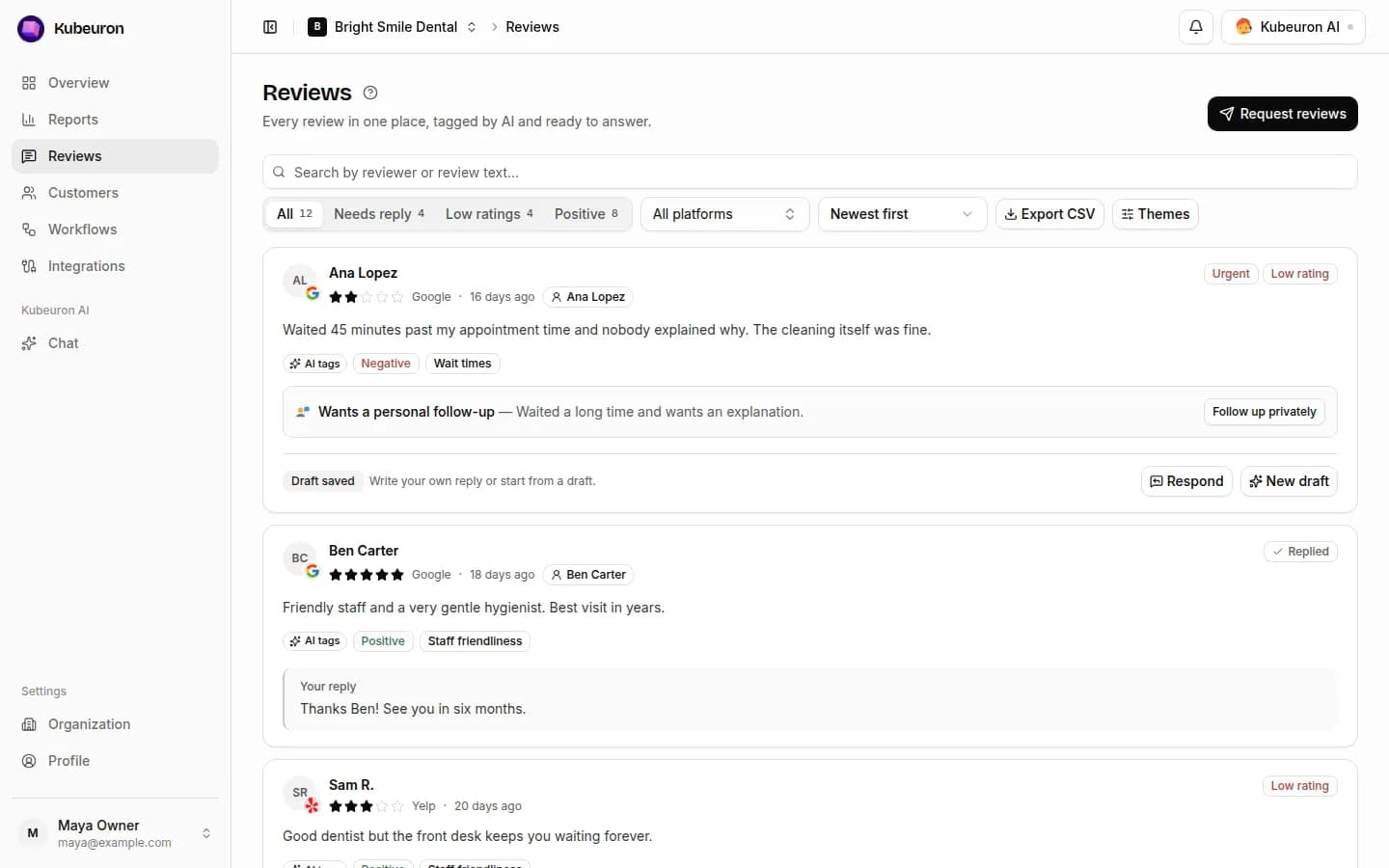
Reviews from every connected site appear in one list, newest first.
Find the right reviews
- Needs reply: no published reply yet. A saved draft still counts.
- Low ratings: 3★ and below. Positive: 4★ and 5★.
- Combine these with search, a platform filter or a theme. Select Themes to see what customers mention most in the last 90 days.
AI tags
AI reads every review and adds:
- Sentiment: positive, neutral or negative.
- Topics: what the review is about, such as wait time, pricing or staff.
- Personal feedback: the customer describes a problem that needs a private conversation, not only a public reply.
Select a topic on any review to show only reviews about it.
Reply
- Select Draft with AI. AI writes a reply in your business's tone that refers to what the customer said.
- Edit it as needed.
- Select Publish reply for Google and Facebook. Yelp, Tripadvisor and Trustpilot don't accept replies from other apps, so select Copy reply and paste it on that site.
A draft is private and can be changed. A published reply is public.
Replying to negative reviews
Reply promptly, apologise once, avoid arguing and offer to continue privately. Then contact the customer directly from their page in Customers.
We're sorry we fell short. This isn't the experience we want for anyone. Please contact us directly so we can put it right.